
Texas Civil Docket Searches
Begin with whatever you hold: a case number or a party name. Then pin down which court took the claim. Texas re:SearchTX searches participating cases, filings, and documents across the state. Yet its results never replace a county clerk's full civil register. The clerk depends on the court. District Clerks hold district-court civil files. County Clerks or assigned clerks keep many county-level files. Justice Courts keep small-claim and eviction records.
Case numbers stay local in Texas. There is no uniform statewide format. Keep the whole number and the court name exactly as printed on the petition, summons, or order. Search Texas civil dockets with the identifier you have. Then work through the county layer to confirm the register and pull the underlying document. The Docket Search page explains how statewide indexing and local court records fit together.
- Note the Texas court, county, cause number, case style, and filing date from a court paper or notice.
- Try re:SearchTX for the participating statewide case, filing, or document entry.
- Check the local clerk’s portal for the court that holds the case; browse Texas counties for local links.
- Compare the court, parties, status, and latest docket event before relying on a match.
- Ask the clerk for the docket sheet, pleading, order, or certified copy by its specific name.
Texas Civil Search Separates Index and Images
The Harris County Civil Case Search shows why this matters in Texas. An index hit and a docket document are two different things. Search filters cover case number, court, status, and filing date. Added modes handle party, attorney, and company lookups. The portal’s County Clerk case index reaches back to January 3, 1977. Document images only begin January 1, 2008. An older index entry, then, does not mean the whole case file is online.
The official page at Harris County civil search controls displays these options. Basic online search is free. Images may require an account and purchase. A certified copy is requested separately from the clerk. Keep in mind that these dates and labels describe this one county portal, not a statewide civil search standard.
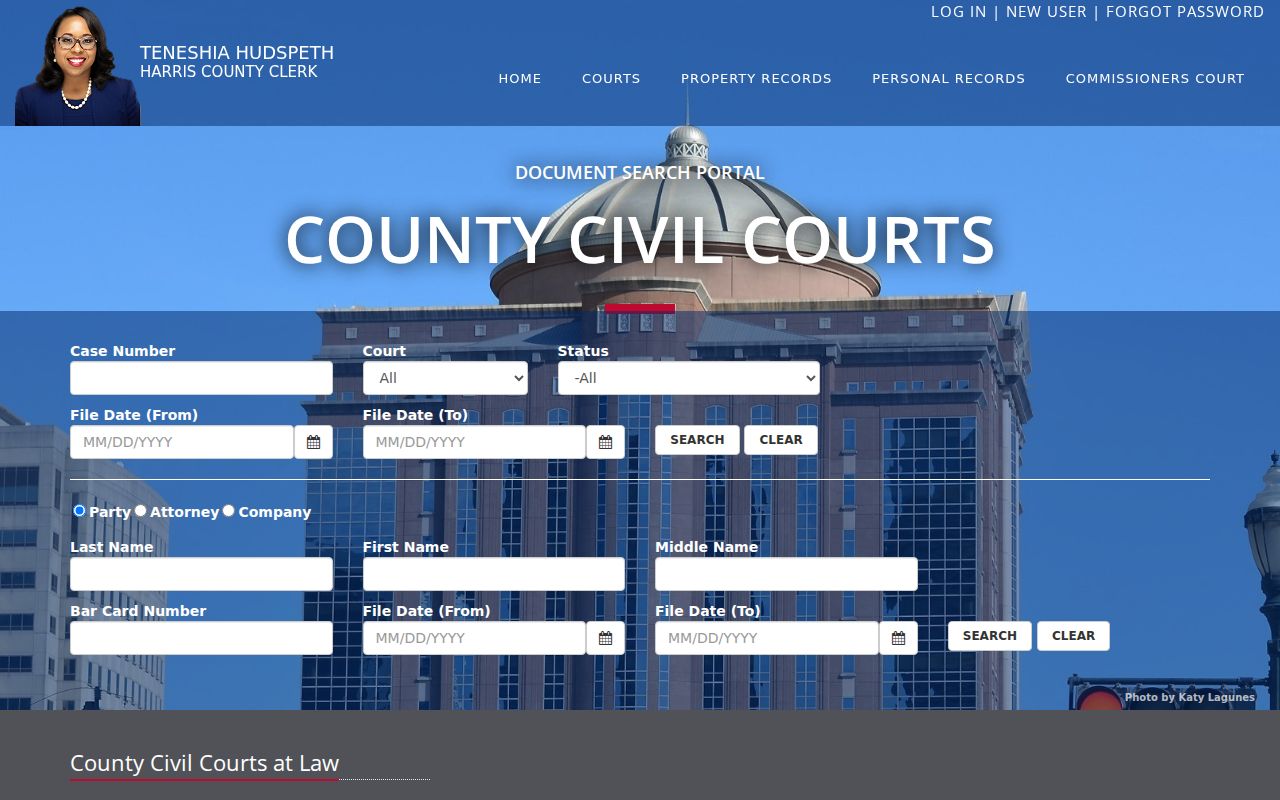
A Texas civil docket search can surface a case whose filings are not online in the same window. When that happens, use the local clerk's copy route. That is how you get the petition, order, or judgment you actually need.
Inside a Texas Civil Docket
A Texas civil docket is the case's filing and event history. It can identify the parties, the court, the filing date, the case category, settings, motions, orders, the judgment, and any appeal. The fields depend on the local Texas court system. A short line usually sums up a filing or a result. It does not reproduce the pleading or explain the judge's reasoning.
| Case number and court | Cause number used by the Texas court, county, court number, filing date, and case style. Use the cause number as printed; there is no single statewide format. |
|---|---|
| Parties and counsel | Plaintiff or petitioner, defendant or respondent, party role, and counsel information when displayed in Texas systems. |
| Filing and service | Petition, answer, counterclaim, return of service, motion, notice, or other filed event. |
| Settings and orders | Hearing or trial date, status, docket call, reset, written order, or result entry. |
| Disposition | Nonsuit, dismissal, default, judgment, settlement notice, post-judgment motion, or appeal marker. |
One Texas civil case can carry several parties, claims, or cross-claims at once. A docket may show that one party nonsuited a claim while other claims live on. Before treating the record as final, read the most recent event alongside the case style and the signed order.
Texas Civil Docket Lines Aren’t Orders
A Texas civil motion is a request, not proof the court granted it. A docket event may simply say a motion or proposed order was filed. The judge's signed order may appear later, or only in a separate document view. In the same way, "pending" can mean the court has not entered a final disposition. It may just mean a local system has not refreshed. "Closed" may be a case-management status. It is not always the complete legal result in a Texas civil case.
- Return of service
- In a Texas civil case, this filing describes whether and when service was attempted or completed. It is separate from the filing date and hearing date.
- Continuance or reset
- A Texas docket may show a continuance or reset to a later setting. The old event can remain in the history while a new setting is added.
- Nonsuit
- A plaintiff’s voluntary dismissal mechanism. Check which claims and parties it covers and whether an order follows.
- Judgment
- The Texas court’s formal disposition of claims. Read the signed judgment for its terms rather than relying on a short status label.
The docket points you toward the controlling filing. It never replaces that document. If a result matters, request or open the signed order and confirm it covers the full claim or case.
Texas Civil Docket Case Types
Texas assigns civil cases by subject, amount, and statutory jurisdiction. The Texas trial-court overview describes the statewide levels. District Courts handle broad civil matters, including higher-value or complex claims, title-to-land disputes, and many family cases. County Courts at Law draw their authority from enabling laws, while constitutional County Courts hold limited civil and probate matters. Always confirm the exact court printed on the Texas case paperwork. Never assume the word "county" points to one court or one clerk.
Texas Justice Courts hear small civil claims within their current amount limit, plus eviction and forcible-detainer cases. Probate or guardianship matters may sit in a constitutional county court, a County Court at Law, or a statutory probate court. The Texas Business Court takes specified complex business disputes under separate statutory rules, with its own clerk and an appeal route to the 15th Court of Appeals.
Texas Civil Docket Courts Compared
Before searching Texas civil records, map the claim to the court and clerk named on the papers. A district-level filing is usually searched through the District Clerk; county-level civil and probate assignments often use the County Clerk or a clerk named by statute. Lower Texas courts retain their own records. The amount or claim type can help narrow the search, but local jurisdiction rules still matter.
| Court level | Common civil matters | Where the docket is kept |
|---|---|---|
| Texas District Court | Broad civil jurisdiction, complex or higher-value claims, land-title matters, and many family cases | District Clerk |
| Texas County Court at Law | Jurisdiction set by the court’s enabling statute; may include civil cases and assigned specialty matters | County Clerk or locally specified clerk |
| Texas Constitutional County Court | Limited civil and probate jurisdiction | Commonly County Clerk |
| Texas Justice Court | Small civil claims up to the current $20,000 ceiling and eviction proceedings | Justice of the Peace court clerk |
| Texas Business Court | Specified complex business disputes under statutory subject and amount rules | Business Court clerk |
Texas Government Code Chapter 27 sets the ceiling for what a Justice Court can hear. County Court at Law jurisdiction is another story. Its authority depends on the statute that created each court. So the limits can shift from county to county. The safest docket search uses the exact court name, the county, and the cause number. One statewide clerk rule will not fit every Texas civil matter.
Hearings on a Texas Civil Docket
Open a Texas civil docket and you may see a status conference, a motion hearing, docket call, or a jury or non-jury setting. You may also see a trial date. The labels mean different things. A docket call or central docket often just sorts cases. It assigns a later trial date. A status or announcement setting is usually about readiness or case management, not evidence.
Watch for resets. When a hearing moves, the old date can linger in the history while a new setting appears above it. The case register may lag a local calendar too, and a posted calendar can miss a change made at the last minute. Line up the newest docket entry against any signed setting order, notice, summons, or official court message. When timing matters, call the court coordinator. The clerk keeps the case file, but the coordinator speaks for the calendar.
When Texas Civil Search Shows No File
A Texas case number can show up in an online index with no documents attached. Harris County’s civil search indexes cases from 1977, yet its listed images begin only in 2008. Other Texas portals draw their lines at different years, with their own login steps and copy options. A case with no image online does not mean the clerk holds no paper or electronic file.
Ask for something specific instead of a vague "record." Tell the right clerk what you want. Name the docket sheet, the original petition, an answer, the final judgment, a named order, or the whole file. Texas counties may take web requests, phone or email, mail, or a walk-up counter. Certification and delivery options differ. The Texas county directory lists each clerk’s current instructions. Some courthouses add a public access terminal for inspecting case records. Hours, images, and archive retrieval vary, so confirm before you travel.
A hearing-date question goes to the court calendar or its coordinator. A copy request goes to the clerk. The two channels do different jobs, and a calendar entry may not reflect the newest change to a case filing or order.
Texas Civil Dockets Use Separate Access Rules
Asking for a Texas civil case file is not the same as asking under the Texas Public Information Act. Courts and judicial-branch agencies sit outside the Act entirely. Rule 12 reaches only judicial administrative records, not the documents that decide a case. Rule 12 also leaves out elected officials other than judges, including district clerks. For a docket sheet, pleading, or judgment, go straight to the clerk that keeps the Texas case. Name the cause number and document.
County clerks do sometimes hold nonjudicial records under a county’s public-information process. It depends on the record and the clerk’s role. For administrative material with a covered judicial custodian, Rule 12 lays out its own written request path. The Office of Court Administration open-records policy spells out the split. Start by naming the actual record you want. Do not just name the office that might hold it.
Civil Docket Access in Texas
Most Texas civil dockets are open. Seeing the case index and seeing each filed image are two different things. A docket entry can stay visible while the document behind it sits redacted or unavailable. Family cases are not sealed just for being family matters. Adoption, child-protection, mental-health, guardianship, and similar protected records can carry statutory or court-ordered limits. When access is cut off, ask the clerk. The clerk can name the rule or order.
Requests for a Texas case file go to the clerk that maintains it. Remember the split described above. Texas courts and judicial-branch agencies are outside the Public Information Act. Rule 12 covers only defined judicial administrative records rather than case files, and it skips elected officials other than judges. Nonjudicial county administrative material may run through the county’s PIA process instead. Identify both the record and its custodian precisely. The county directory routes you to the court or clerk portal for local civil dockets.
Key Rules:
Texas Rule of Civil Procedure 76a sets a sealing process for covered court records, subject to the rule’s scope and exceptions.
Texas Rule of Civil Procedure 21c requires redaction of specified sensitive personal information in electronically filed documents.
Texas Family Code Chapter 58 restricts specified juvenile records, with access depending on the record and statutory exceptions.