
How the Texas Case Search Works
Texas re:SearchTX serves as the public access layer for case, filing, document-text, and hearing searches. It draws from participating Texas court sources. The tool is good at flagging a likely matter across connected systems. Once you find a match, you can open the case, filing, or hearing details. That works when the details are supplied. It is not a live, complete docket for every Texas court. What appears depends on which court and source send data, which case types are included, and how far back each source's records reach.
The official Texas re:SearchTX portal is built around a global search plus categories. Filters can surface only after a query runs. So there is no fixed set of fields for every Texas search. Keep one thing in mind: the local clerk still holds the official case file. The result may be just an index or summary. Request a docket sheet or certified copy from the clerk who keeps the underlying record.
The portal's landing screen lists the search categories rather than an example case. That layout makes the split plain before you run any search. A statewide access layer sits on one side. A specific Texas court record sits on the other.
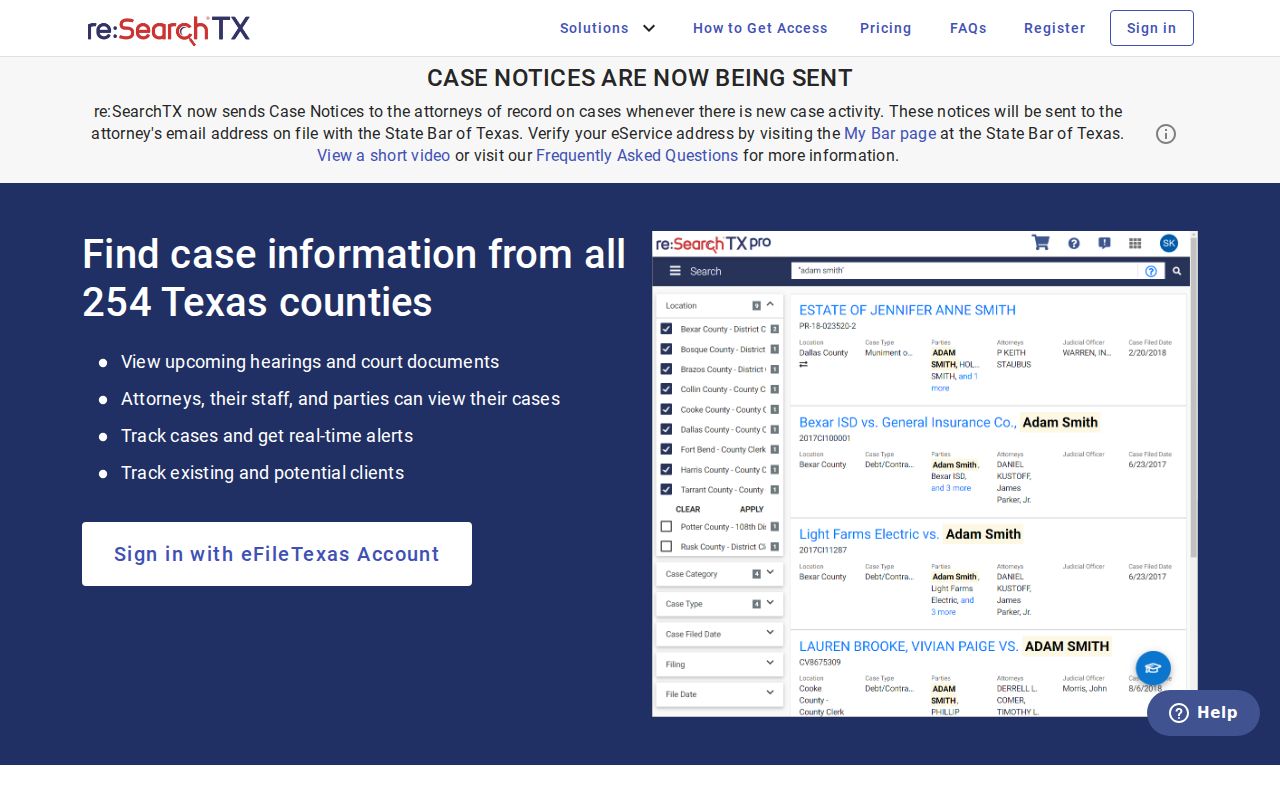
Pick the Texas search category that fits what you already know. Then confirm the court and county shown in any match.
- Open Texas re:SearchTX and choose Cases, Filings, Text in Documents, or Hearings based on the record you seek.
- Enter a Texas cause number, name, phrase, or other known search term in the global search bar.
- Review the dynamic filters that appear. Narrow the Texas query where the portal offers a court, date, or case-type option.
- Open the matching Case Details, Filing Details, or hearing information, then verify the Texas court, county, and filing date.
- Sign in with eFileTexas credentials or create an account and activate it by email for the Texas portal, as described in its guide.
| Search Area | What It Locates | Reading the Result |
|---|---|---|
| Cases | Connected Texas case records matching a query and available filters. | Open case details and verify the court and county. |
| Filings | Filing records in participating Texas systems. | A Texas docket label may summarize a document without showing its full text. |
| Text in Documents | Text matches within indexed Texas documents. | A hit does not mean every filing is indexed or viewable. |
| Hearings | Hearing information sent by participating Texas sources. | Confirm the date with the Texas court’s current calendar or notice. |
| Global search and filters | Texas search terms and the filters offered for that query. | Options can change by category and connected data source. |
The Criminal Gap in Texas Case Search
Do not read "statewide" as every Texas trial case in one set of results. Texas Office of Court Administration materials describe re:SearchTX as an access layer. It is assembled from participating sources. The 2024 Data Committee report describes the repository's case records back to 2016. It states that criminal case records are not part of that described Texas repository. Coverage also shifts. The court, case type, document, county, and historical conversion all play a part. A missing match means "not indexed here," not that no Texas case exists.
The official Texas re:SearchTX Quick Reference Guide, version 2021.2 describes free searching after sign-in. Some document images may require a separate purchase. Current dropdowns, county coverage, image prices, and update timing live on the portal itself. Check the current terms and the Texas checkout screen first. Do this before you buy. An account does not make every filing free. And an image purchase is not a clerk-certified copy.
When a Texas criminal trial case fails to appear, go to the responsible county or local court system. Ask the clerk which record office keeps the file. District criminal matters, county-level criminal matters, justice-court cases, and municipal cases may sit in different Texas systems. The local source remains the route to the official case history.
Note: A missing statewide match alone does not establish that a Texas criminal case or filing is absent.
Searching Texas Cases by Number
A Texas cause number is usually the sharpest starting point. This holds especially for one copied from a court notice, citation, order, or filing. Enter the whole thing: court prefix, punctuation, leading zeros, all of it. Texas has no single statewide numbering pattern. You cannot safely decode one across counties and court levels. Each local clerk assigns and maintains the number in its own case system.
Use the Texas number as printed: cause number exactly as printed on the court paper. If the statewide search returns nothing, look for a typo. Also check for a dropped prefix, a punctuation difference, or an alternate number on another Texas notice. No number at all? Search by case style or party. Then narrow with county, court, case type, and a filing-date range where those fields are offered.
A Texas appeal carries its own appellate cause number. A TAMES result may link the appeal to its trial-court number. But the appellate docket and the original county case stay separate records. Give the clerk the court and county whenever you ask about an older or ambiguous number.
Note: County, court level, punctuation, and year all matter when asking a clerk to search an older cause number.
Which Texas Case Search Field Fits?
Pick a Texas case-search field that actually identifies the matter. A name alone will not do it. Common names can pull back unrelated Texas cases. Even a single case may be indexed under a business or agency style, an abbreviated party name, a prior name, or a different court level. Date filters add their own trap: in some Texas counties the date field means filing date, not hearing date. Read the field label before you draw any conclusion.
Quick choice: use the Texas cause number when known; use case style or party terms when it is not; narrow by court, county, and filing date to check the match.
- Cause number
- Best for locating a known matter; keep the court prefix and punctuation.
- Style or party
- Useful when the number is missing, but verify the court, county, case type, and filing date.
- Attorney or bar number
- Available in some local search tools; confirm that the attorney entry belongs to the case you need.
- Filing date
- Can narrow a county portal result list; it is not necessarily the hearing date.
Treat a Texas name match as unconfirmed until the court, county, case type, and filing date all fit the record you are chasing.
Inside a Texas Case Search Result
What a Texas case search result shows depends on where you run it. Each official system pulls its own fields. One record may list a case style and filings while another adds parties or judgments. Treat the common field list here as a guide. It is not a guarantee. No re:SearchTX record is required to contain every field. Check the live Texas record to see what the current result view actually displays.
| Cause Number | Local Texas case identifier. Numbering differs by county, court, clerk, and year. |
|---|---|
| Case Style or Parties | Texas caption or party labels; names may be shortened or styled differently across systems. |
| Court and County | Shows where the Texas trial case is held when the source provides that information. |
| Filing Date | When the Texas case or filing was accepted or indexed; a filing date is not a hearing date. |
| Status | A local label such as open, pending, closed, inactive, dismissed, or disposed. It does not replace the event history. |
| Event or Document | Short Texas docket text may describe a filing, setting, order, or judgment. The underlying instrument can contain more detail. |
| Image or Hearing Link | May appear when the source supplies it; access, availability, and update timing can vary. |
A Texas docket label is a pointer, not the order itself. A filing entry only means someone submitted a request. It does not tell you a judge granted anything. A short disposition label can also hide the full judgment, so when the exact language matters, ask the originating Texas clerk for the named document, the full docket sheet, or a certified record.
Note: re:SearchTX filters shift with the search category and source, so the controls may differ from the descriptions in its old guide.
Texas Appellate Search Uses TAMES
For a Texas appeal, the tool is the Texas Appellate Management and E-filing System. It is known as TAMES. This is an appellate system, not a trial-court calendar. Its search filters by appellate court, full or partial case number, civil or criminal type, filing-date range, case style, attorney or bar number, originating appellate court, trial-court case number, trial county, and trial court. Court choices run from All Courts to the Supreme Court. The Court of Criminal Appeals and Courts of Appeals 1 through 15 are included too. Some choices shift once you pick a court. TAMES also splits into separate Case Search and Document Search tabs.
The TAMES Texas appellate case search notes that results update nightly. Accuracy and document coverage can vary, it adds. The page displays appellate search controls, not a Texas county trial-court record.
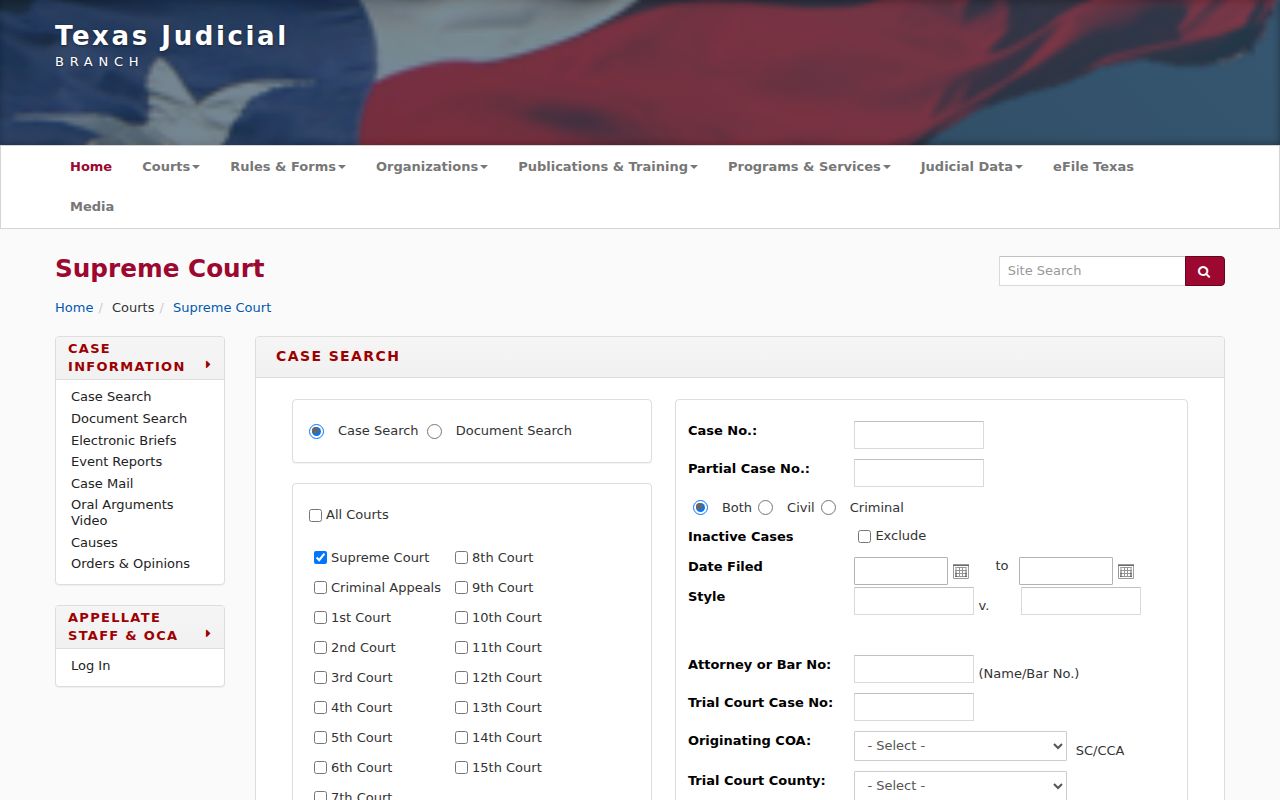
Every Texas appeal carries its own appellate cause number and its own appellate clerk. The trial case lives on in the county or other originating court system. So for a trial setting, return to the local court or clerk. The same goes for the full trial docket. A TAMES result is not the lower-court record.
County vs Statewide Search in Texas
re:SearchTX works best for scanning participating Texas sources. It is good for spotting a likely court or filing. Need the full trial-court event history? Use the local Texas clerk's system. The same applies to a document from the case file or a certified copy. Texas has no single clerk or portal covering every trial level. A District Clerk, County Clerk, justice-court clerk, or municipal clerk may each hold a different piece of a Texas record.
Start local by naming the Texas court and county. Then use the Browse Counties directory to reach the right clerk and court links. The statewide portal is an index and access layer. The originating Texas clerk keeps the trial case file. That office is the one to ask for official copies.
| Need | Texas Statewide Index | Local Court or Clerk |
|---|---|---|
| Find a likely case | Search across connected and participating Texas sources. | Search the system used by the specific Texas court and clerk. |
| Coverage | Varies by court, source, case type, document, and year. | Local systems may include records not surfaced statewide; archives can still require clerk help. |
| Full event history | May show a Texas index or summary and selected linked items. | Ask the originating Texas clerk for the complete docket sheet or case-file access. |
| Document image | May require account access or a separate purchase. | The clerk can explain local access and copy procedures. |
| Certified copy | Search results are not certified copies. | Request from the clerk that holds the official case record. |
A Texas local docket is not always a complete online file. Some portals show only basic case history. Older images, restricted papers, or archived material may require a separate request to the clerk. Ask the Texas clerk what record is available before you rely on any search summary.
Note: A local filter or archive date describes that one court system. Do not apply it to every Texas case search.
Local Filters in Texas Case Search
County-level tools in Texas can offer controls the statewide portal never shows. The Harris County Clerk's Texas civil case search is one example. It allows an optional case-number field of up to 15 characters. There is a court filter for All or courts 1 through 5, plus status and filing-date controls. Search modes cover party, attorney, or company. Dates use MM/DD/YYYY format. Party mode takes names. Attorney mode can use a bar card number. Company mode swaps the query field. These controls belong to Harris County alone. They are not a statewide Texas code set.
The status menu uses local Texas labels. Examples include Closed, Dismissed, Inactive, Open, Open Garnishment, Pending Fee Compliance, and Re-Opened. Those are Harris County terms, not universal Texas case outcomes. Read the event history and the underlying order. Do not trust one status label to explain the whole case.
The Harris County civil case search states that its online filing records reach back to January 3, 1977. Images begin January 1, 2008. The basic case search is free. Image viewing or purchase and account access can be separate steps.
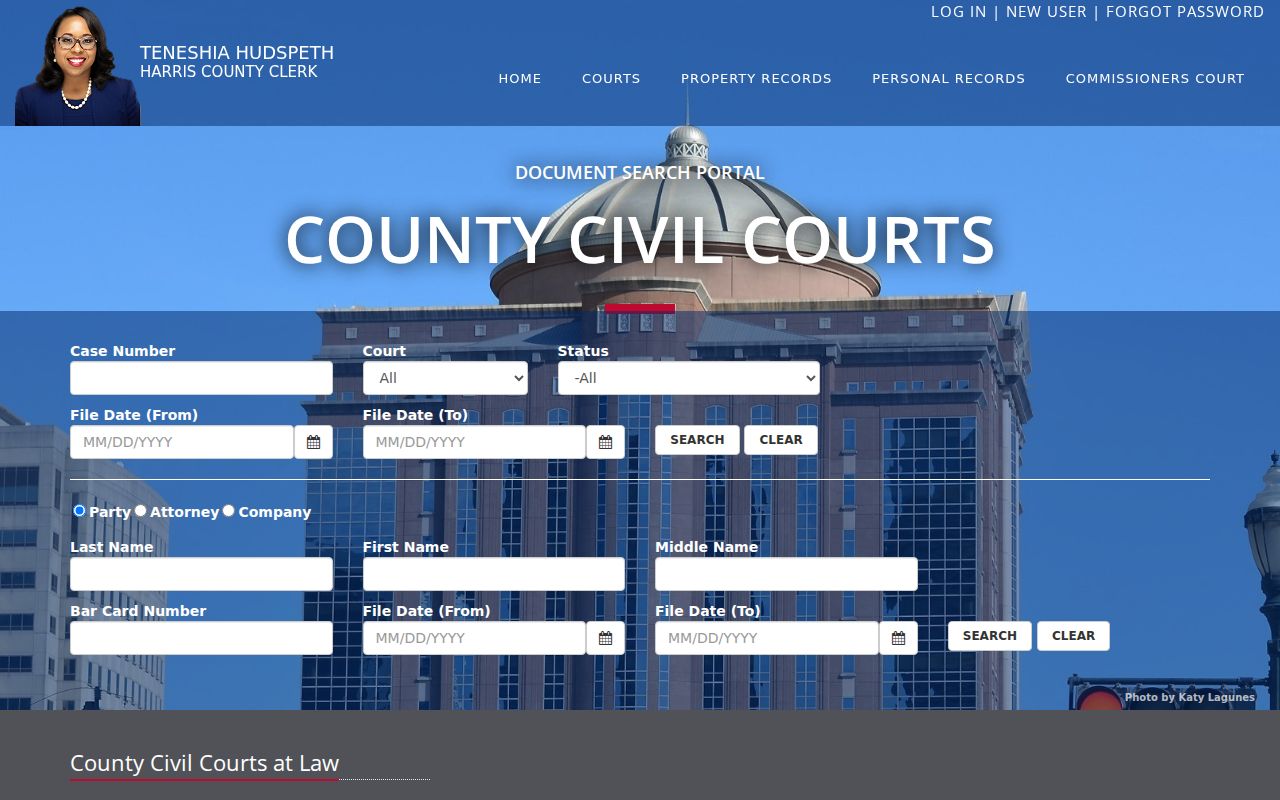
The controls described here are one Texas county example. Court numbers, status names, archive dates, and image access rules can all differ elsewhere in Texas. Use the county directory to find the portal and fee instructions for the Texas court that actually holds the case.
Texas Case Search Without a Filing Image
A Texas case search result can identify a case or filing. That holds true even when no image is attached. A missing image may reflect the source's coverage dates. It may reflect a separate account or purchase step, a record that was never scanned, or an access restriction. It does not prove the filing never existed.
Use this path when the docket entry is present but the document is not:
- Write down the Texas cause number, court, county, filing date, and the exact event or document label.
- Check whether the Texas portal asks for sign-in or purchase and review the current terms before proceeding.
- Search the originating Texas clerk’s local portal for the same event and date.
- If no image appears, contact the Texas clerk and request the named filing, order, judgment, or docket sheet. Ask about copy and certification options.
Finding a case, seeing the filing itself, and getting a certified copy are three separate steps in Texas. The docket search is free. Pulling up the document image can cost a fee. Even then, a paid image is not the same thing as a Texas certified record.
Texas Case Access Rules
A Texas public search account opens some doors, not all. Filing through eFileTexas, searching public Texas case information, and viewing a particular filing are three different permissions. An attorney's access may not match a public user's. Even when a Texas case index exists, sealed or restricted material can stay off limits.
When a Texas result is missing, check the court and case type first. The same applies when a document is blocked. Then ask the clerk whether the record sits in a different system or under an access restriction. Some material is simply redacted or left out of the public view. A missing result does not mean the case never existed. The clerk who maintains the case can explain the correct access route.
Search is not the whole record. Use the statewide index to locate a possible case, then confirm coverage, document availability, and official-copy requirements with the court or clerk that holds the file.